
Does Water Eject Sound Really Work?
Yes — for water trapped in the speaker grille, a water eject sound really works. No — for water damage inside the phone, it does not.
That split is the whole answer. A speaker grille is a tiny mesh, and water sitting in it muffles sound. A loud low tone shakes the diaphragm hard enough to push those droplets out, and once the water is out, the sound comes back — usually within a couple of cycles.
But if water got past the seals and reached the parts inside the phone, the speaker is not blocked — it is damaged. Shaking it will not fix it. The test below tells you which case you are in, in about five minutes.
Test It Yourself First: The Before-and-After Protocol
You need nothing except your phone and a quiet room. The idea is simple: record the speaker before the tone, run the tone, then record it again and compare. If the sound is clearly better after, the tone worked. If nothing changed, the problem is not trapped water.
Step 1: Record the “before” sample
Open your voice recorder app and start a new recording. Hold the phone about 15 centimetres from your mouth, then play a steady test tone from the speaker — around 440 Hz works well — and capture ten seconds of it. Say “before test” at the end so you can tell the two samples apart. Listen back with headphones and note what you hear: muffled, crackly, quiet, buzzing, or normal.
If the speaker makes no sound at all here, stop. A silent speaker is a stop sign, not a test subject — skip to the stop-signs section below.
Step 2: Dry the outside first
Wipe the phone with a soft, lint-free cloth, paying attention to the speaker grille at the bottom edge. Tilt the phone speaker-down and give it a gentle shake — one or two flicks, not a violent swing. Wipe the grille again. This removes the surface water, which the tone cannot reach anyway.
Do not use a hair dryer, compressed air, or heat — hot air can push water deeper and damage the adhesive that seals the phone. Do not poke anything into the grille either: a pin can puncture the mesh or the speaker behind it.
Step 3: Run the water eject sound
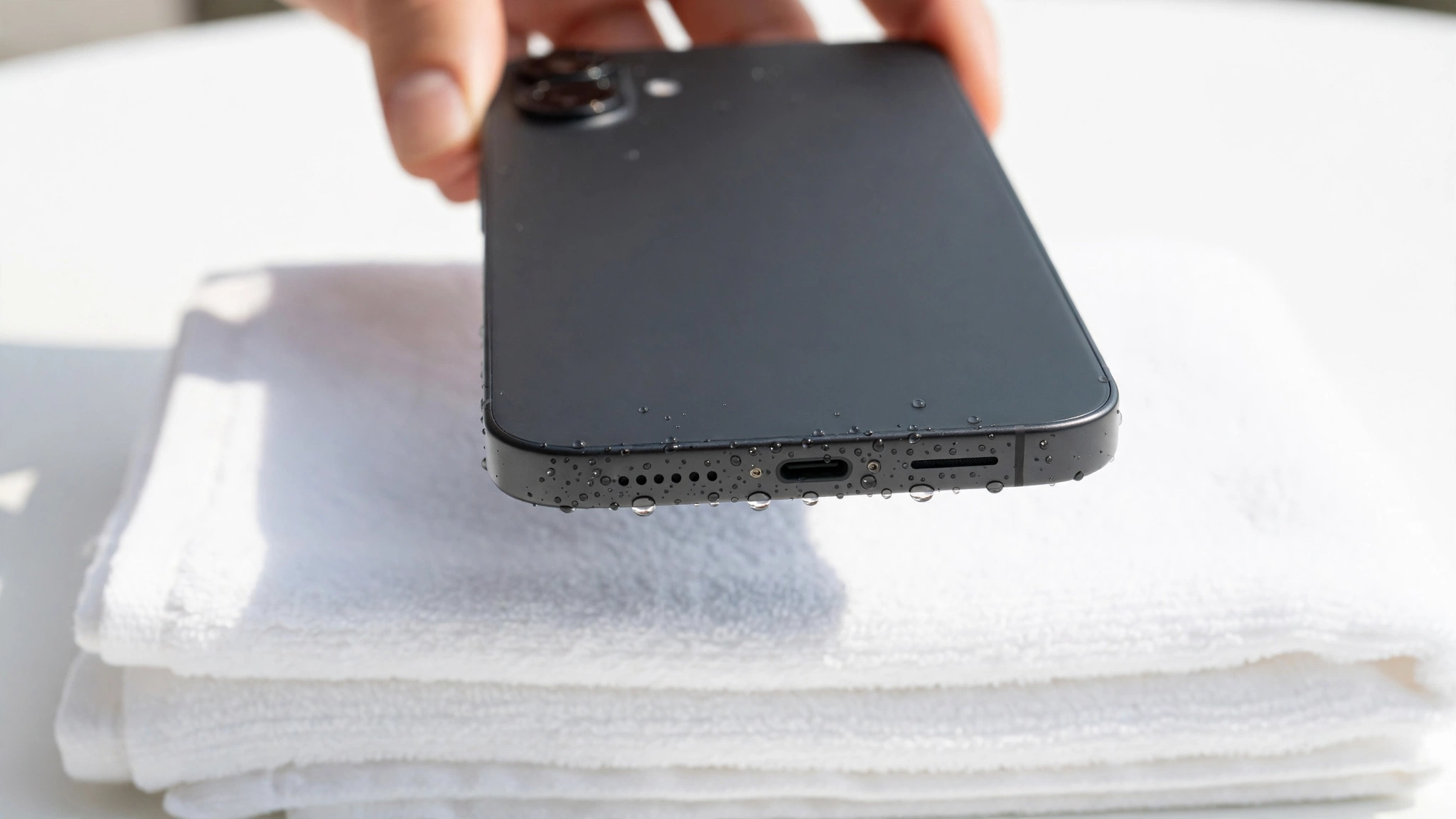
Hold the phone speaker-down over a towel or a sink. Play a water eject tone — a 165 Hz tone or a slow frequency sweep — at 70 to 80 percent volume (full volume is fine if the speaker sounds healthy). Let it run for 30 to 60 seconds, watching the grille: you should see tiny droplets appear and fall away. When the cycle ends, wipe the grille.
Step 4: Repeat, but only twice more
Run a second cycle the same way, then a third if the second one still pushed water out. That is the whole protocol — two to three cycles in total. Do not run ten: if three have not cleared the grille, more will not help.
Step 5: Record the “after” sample and score it
Repeat step 1 exactly — same app, distance, tone, volume, ten seconds — saying “after test” at the end. Listen back with the same headphones and compare the two recordings. Score the result:
- Pass — the tone worked. The after recording is clearly louder, clearer, or less crackly. You can stop here. Let the phone air-dry for a few hours, speaker down, and retest later to confirm it holds.
- Partial pass — it helped, but not fully. The sound is better but still not normal. Air-dry for several hours, then retest once. If the second test improves further, trapped water was the problem and drying is finishing the job.
- Fail — the tone did not help. The after recording sounds the same or worse, and no water came out during the cycles. The problem is not water sitting in the grille — read the limits section below and check the stop signs.
Write the result down — “pass after 2 cycles, much clearer” is worth more than a vague memory if the problem comes back and you need to describe it to a repair shop.
What the Test Results Mean
A pass means the speaker was blocked by water in the grille, and the tone cleared it. A partial pass usually means some water is still drying out of the grille and mesh, which takes hours, not minutes — leave the phone in a dry, ventilated place, speaker down, and retest after several hours. Patience, not more cycles, is the right move here.
A fail means the fault is somewhere the tone cannot reach: water on the speaker’s internal parts, a corroded contact, or damage to the audio circuit. It may also mean the problem was never water at all — a software setting, a dusty grille, or a speaker that was already failing. Either way, stop running tones and read the limits and stop-signs sections below.
Water Eject Methods Compared
There is more than one way to push water out of a speaker, and they are not equal. Some are built into the device, some are community workarounds, and one is a myth that can damage your phone.
| Method | What it actually does | When to use it | Drawbacks |
|---|---|---|---|
| 165 Hz tone | A steady low tone that moves the diaphragm in large strokes, pushing droplets out of the grille | The standard first step for any wet phone speaker | Fixed frequency, so it may not suit every grille |
| Frequency sweep, 100–400 Hz | Sweeps low tones so at least one frequency moves the diaphragm well | When a single 165 Hz tone shows no improvement | Takes longer per cycle |
| Apple Watch Water Lock | Plays tones to push water out of the watch speaker after swimming | Built into the watch — turn the Digital Crown to unlock | Only exists on Apple Watch, not on iPhone |
| iPhone Siri shortcut | A community-made shortcut that plays a low tone through the iPhone speaker | When you want a one-tap tone on an iPhone | Not an Apple feature, and shortcut quality varies |
| Rice in a bowl | Absorbs moisture from the air around the phone very slowly | Never the first choice | Apple advises against it — rice particles can get into the phone |
| Air-drying | Lets trapped water evaporate on its own over hours | Always, alongside any tone method | Slow, and useless for water already inside |
The 165 Hz tone is the sensible default: simple, quick, and easy to repeat. A frequency sweep is the better second attempt if the single tone fails, because different grilles and amounts of water respond to different frequencies. Neither is magic — both do the same job, just at different frequencies.
Apple Watch Water Lock is the proof that this principle is real. Apple built it into the watch, starting with the Apple Watch Series 2 in 2016, to push water out of the watch speaker after a swim. The same principle applies to a phone speaker — Apple simply never built it into the iPhone.
The iPhone Siri shortcut is not an Apple feature. It is a community-made shortcut that plays a low tone through the speaker, and it can work — the tone is what matters, not who wrote the shortcut. But it is not tested or supported by Apple, so results vary, and a tone from a proper speaker test tool is more reliable.
Rice is the method to stop using. It absorbs moisture slowly from the air, not from inside the phone, and does almost nothing for water trapped behind a grille. Worse, Apple advises against putting an iPhone in rice because small rice particles can get into the phone. Air-drying works better and carries no risk.
What Water Eject Sound Cannot Fix
A water eject sound can only move water sitting in or on the speaker grille. Everything else is beyond it — and the gap between what a tone can do and what people expect is where phones get ruined.
It cannot fix water that reached the circuit board. Once water touches the board, it can short connections and start corrosion that keeps eating at the metal long after the phone looks dry. It cannot fix a speaker that is already damaged either: if the diaphragm tore, the coil shorted, or a contact corroded, the speaker will sound distorted or silent no matter how many tones you play. A damaged speaker needs a replacement, not a vibration.
It cannot fix the charging port, the cameras, or the microphones. Water in the charging port can stop the phone charging or trigger a liquid warning. Fog inside a camera lens means water got inside the sealed camera module. A muffled microphone is a different component, and a speaker tone will not clear it.
It cannot fix a software problem. If the phone is stuck in headphone mode, or the volume is routed to the wrong output, the speaker will stay silent even though nothing is wrong with it — check the output settings and restart the phone before assuming water is the cause. And it cannot undo time: the longer water sits inside a phone, the more damage corrosion does. A tone run within minutes is a quick, low-risk first step; two days later, it will not reverse anything.
Stop Signs: When to Put the Phone Down and Get Repair
Some symptoms mean the phone needs a repair shop, not another cycle:
- No sound at all. A speaker that makes no sound, not even a click or a buzz, is likely disconnected or dead. A tone cannot wake it up.
- The phone will not charge. Water in the charging port can cause a short, and plugging in a charger anyway can make it worse. Let the port dry fully first — if it still will not charge, get it checked.
- Random reboots or crashes. A phone that restarts on its own after getting wet has water where it should not be, usually on the board.
- Camera fog. Fog inside a camera lens means water got inside the sealed camera module. It will not dry out on its own.
- “Liquid detected” warning. If the phone shows a liquid warning when you plug in a charger, believe it. Unplug immediately and let the phone dry.
If none of these apply and the test gave a pass or a partial pass, you are probably fine. If any of them apply, a tone will not fix it, and the longer you wait, the more a repair will cost. Back up your data, then take the phone to a repair shop and tell them exactly what happened and when.
Why 165 Hz Became the Standard
The 165 Hz figure comes from a 2017 test in which a Reddit user tried different tones on a wet iPhone 7 and found water moved most around 165 Hz, a result reported by BGR. It stuck because it works well enough, not because it is a magic number: low enough for large diaphragm movement, and high enough that tiny phone speakers can still drive it hard. There are no large independent studies of water eject tones, so treat the tone as a quick low-risk first step, not a guaranteed repair. For the full explanation, see our 165 Hz water eject sound guide.
Tested on
Run this checklist yourself before deciding the tone did or did not work — the same before-and-after test from the start of this article, condensed into steps.
- Record a ten-second test tone with your voice recorder app and note how it sounds. This is your “before” sample.
- Wipe the phone, tilt it speaker-down, and shake out any surface water. Do not use heat or compressed air.
- Play a 165 Hz tone or a 100–400 Hz sweep for 30 to 60 seconds at 70 to 80 percent volume, speaker down. Wipe the grille between cycles.
- Repeat for a second and third cycle only. Stop after three cycles even if water is still coming out.
- Record the same ten-second test tone again and compare it with the before sample using the same headphones.
Pass means the after recording is clearly louder and clearer. Partial pass means it improved but is not normal yet — air-dry for several hours and retest once. Fail means the after recording sounds the same or worse and no water came out, so the problem is not trapped water: check the stop signs above and consider a repair instead of more cycles.
Frequently Asked Questions
Does water eject sound really work on a phone that fell in water?
Yes, for water trapped in the speaker grille — a few cycles of a low tone usually clear it and the sound returns. It does not fix water that reached the parts inside the phone, so run the before-and-after test above to find out.
How many times should I run a water eject sound?
Two to three cycles of 30 to 60 seconds each, speaker facing down, with a wipe between cycles. If three cycles change nothing, more will not help — the problem is not trapped water.
Is a water eject sound safe for my phone speaker?
Yes, at normal volume it is safe — the tone only moves the diaphragm the way music does. Use 70 to 80 percent volume, or full volume if the speaker sounds healthy, and stop if you hear crackling.
Should I put my wet phone in rice instead?
No. Apple advises against putting an iPhone in rice because small rice particles can get into the phone, and rice absorbs moisture too slowly to help a speaker grille. Air-drying in a ventilated room works better and carries no risk.
Related Guides
- 165 Hz water eject sound: what it is and how it works
- Test your phone speaker after water damage
- Phone speaker muffled after water: what to do first
- How to fix a phone speaker that sounds wrong
- Try the free tone generator for a speaker test
A water eject sound really works — for the one job it was made for. It clears water from the speaker grille, and the before-and-after test proves it in five minutes. For anything deeper, it is a first step, not a repair.
Run the test on our free speaker cleaner tool and find out which case your phone is in.