
Why Does Only One Speaker Work on My Pixel 8a?
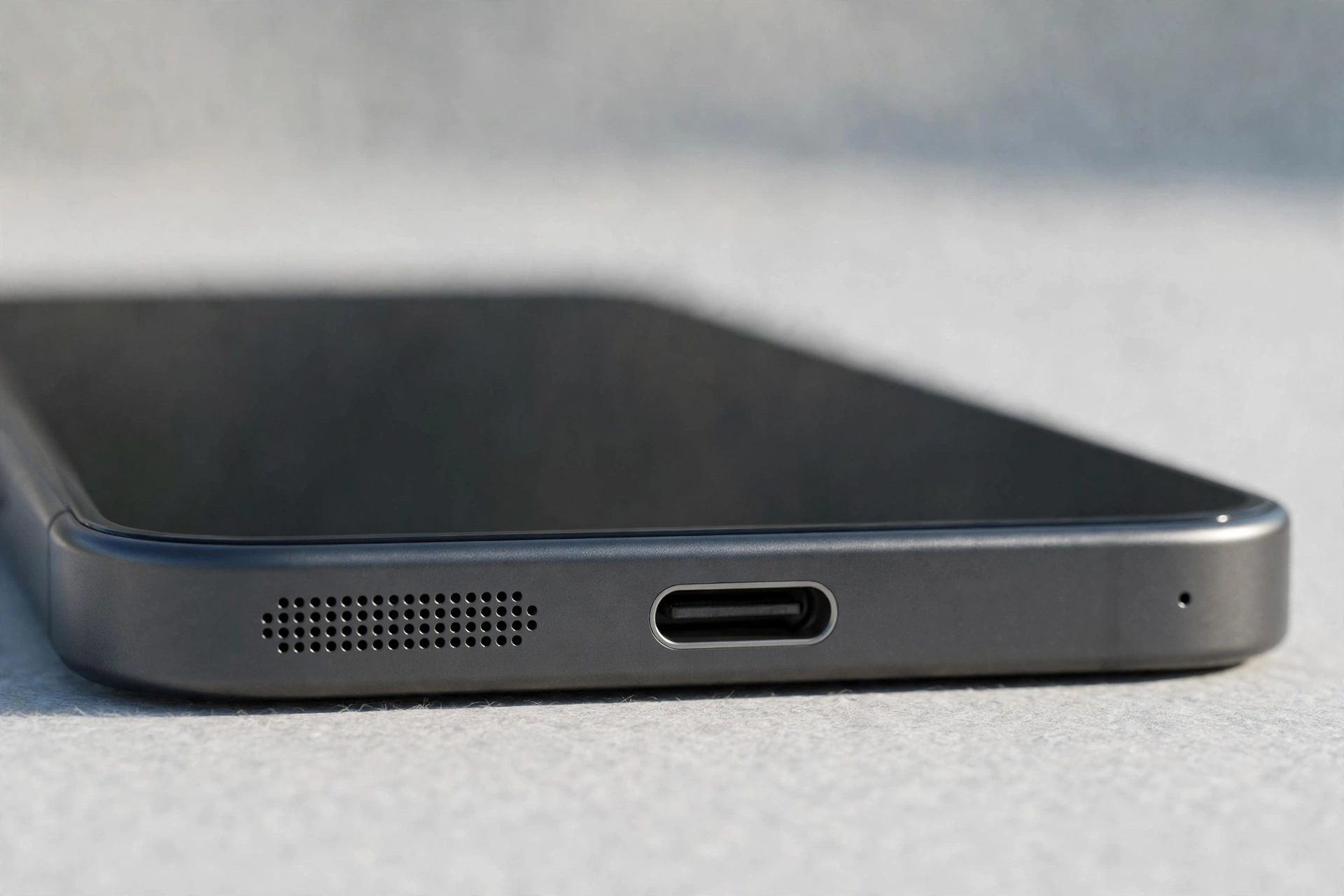
Your Pixel 8a is probably not broken at all. It has only one speaker on its bottom edge, beside the USB-C port. The matching grille on the other side is not a second speaker — it is a microphone. Hearing sound from one bottom corner only is exactly how the phone was designed.
Look at the bottom edge: one speaker, one microphone
Pick up your Pixel 8a and look at the bottom edge in good light. On one side of the USB-C port you will see a row of small holes — that is the loudspeaker. On the other side there is a similar-looking grille, and it is easy to assume it is a second speaker that has stopped working. It is not. That grille covers a microphone used for calls, voice recording, and noise cancellation.
This is the most common “speaker fault” reported on Pixel phones, and it is a false alarm — people try resets and sometimes pay for a repair, all for a speaker that never existed. Cover the microphone grille with your thumb while a video plays: the sound will not change, because nothing was coming from there.
The Pixel 8a does still play stereo sound, just not the way you might expect. For music and video it pairs the bottom speaker with the earpiece at the top, which doubles as a second speaker. That is why sound seems to come from both ends of the phone when you watch a video in landscape, even though only one grille sits at the bottom. Cover the earpiece slit during a video: if the sound gets thin and one-sided, both speakers are working.
So when is it actually broken?
Now that the false alarm is out of the way, here is how to tell a real fault from the design. Play a video at full volume with the bottom speaker facing you: the sound should be clear and reasonably loud. Cover the earpiece with your thumb and the sound should get noticeably thinner; then cover the bottom grille and the sound should drop sharply. If covering the bottom grille changes nothing, or the sound is faint and muffled even at full volume, you have a genuine problem with the bottom speaker.
A muffled bottom speaker is usually a blocked grille: pocket lint packs into the small holes over months, and the sound fades so gradually that one day it seems to have failed overnight. Hold the phone speaker-down and brush the grille gently with a soft, dry toothbrush. Never poke a pin into the holes — the mesh tears easily. If the phone has been near water, run the free speaker-cleaner tool at Fix My Speaker for a short session with the volume up and the speaker facing down.
If the sound is distorted or crackly rather than quiet, turn the volume down to about two-thirds. A crackle that vanishes at lower volume is usually the speaker being overdriven, not broken. A crackle at every volume, or sound that cuts out when you tilt or tap the phone, points to a loose internal connection after a drop — that one needs a repair shop.
Low volume on calls only? Check Clear Calling and the earpiece
A different Pixel 8a complaint is that media sounds fine but calls are too quiet. First, check the obvious: during a call, press Volume Up and make sure the in-call volume slider is actually up — it is separate from the media volume. Second, clean the narrow earpiece slit at the top of the screen, which clogs easily; a blocked earpiece makes every caller sound distant.
Then check Clear Calling, a Pixel feature that reduces background noise on calls. On some calls it also trims the caller’s voice and makes them sound quiet or muffled. Open Settings, then Sound & vibration, then Clear Calling, and turn it off for a few calls to compare. If callers suddenly sound louder and clearer with it off, leave it off — you have found your fault. If only one contact is always quiet, their microphone or connection is the issue.
Developer Options: the Bluetooth fixes that actually help
If your Pixel 8a sounds fine through its own speaker but goes quiet or distorted on Bluetooth earbuds or a car stereo, the fault is in how the phone talks to that device — and the fixes live in Developer Options. Only change one setting at a time, so you know which one helped.
First, turn Developer Options on: open Settings, then About phone, and tap Build number seven times until you see the confirmation. Then go to Settings, then System, then Developer Options, and scroll to the Bluetooth audio section.
Start with Bluetooth AVRCP version, the protocol your phone uses to control playback on a Bluetooth device — some earbuds and car stereos behave badly with the newest version. If the device and phone volumes seem to fight each other, try AVRCP 1.4 or 1.3, then reconnect the device. Next, try Disable Absolute Volume: turn it on, and the phone and the device will control their volumes separately instead of being locked together. That alone fixes the “volume stuck low on Bluetooth” complaint for many Pixel owners. Finally, try Hearing Aid Compatibility: it changes how call audio is routed on Bluetooth and can clear up quiet or choppy call audio. If a change makes things worse, put it back.
The last checks before you call it hardware
If the bottom speaker is genuinely silent after cleaning, restart the phone and test again — a stuck audio service is a real cause of silent speakers on Pixels. Then check for a system update under Settings, then System, then System update. Boot into Safe Mode by holding the power button, then pressing and holding Power off until the prompt appears: if the speaker works there, a third-party app is interfering, so restart normally and uninstall recently added volume or call-recording apps one at a time.
If the speaker stays silent through all of that, the fault is hardware. Tell the repair shop everything you have tried, including the Safe Mode result, and check your warranty first — a dead speaker on a phone this new should be covered.
Frequently Asked Questions
Why does only one speaker work on my Pixel 8a?
The Pixel 8a has only one speaker on its bottom edge, beside the USB-C port. The matching grille on the other side is a microphone, not a second speaker, so silence from that side is normal.
Does the Pixel 8a have stereo speakers?
Yes, in a sense — it pairs the bottom speaker with the earpiece at the top, which doubles as a second speaker for music and video. Cover the earpiece during a video and the sound gets noticeably thinner.
Why are calls so quiet on my Pixel 8a?
Check the in-call volume during a call, clean the narrow earpiece slit, and try turning off Clear Calling in Settings, then Sound & vibration. It can trim the caller’s voice and make calls sound muffled.
What does Disable Absolute Volume do on the Pixel 8a?
It lets your phone and a Bluetooth device control their volumes separately instead of locking them together. Turn it on in Developer Options if Bluetooth volume seems stuck low or the two volumes fight each other.