
Why Do I Sound Muffled on Phone Calls? Fixes That Work
If people keep asking you to repeat yourself on calls, the problem is probably not your voice — it’s your phone’s microphone. When you sound muffled, distant, or “like you’re in a tunnel” to the other person, something is interfering with the mic signal. This guide covers the 7 most common causes, from a blocked mic hole to network quirks, so you can sound clear again.
Fix 1: Check for a Case or Screen Protector Blocking the Mic
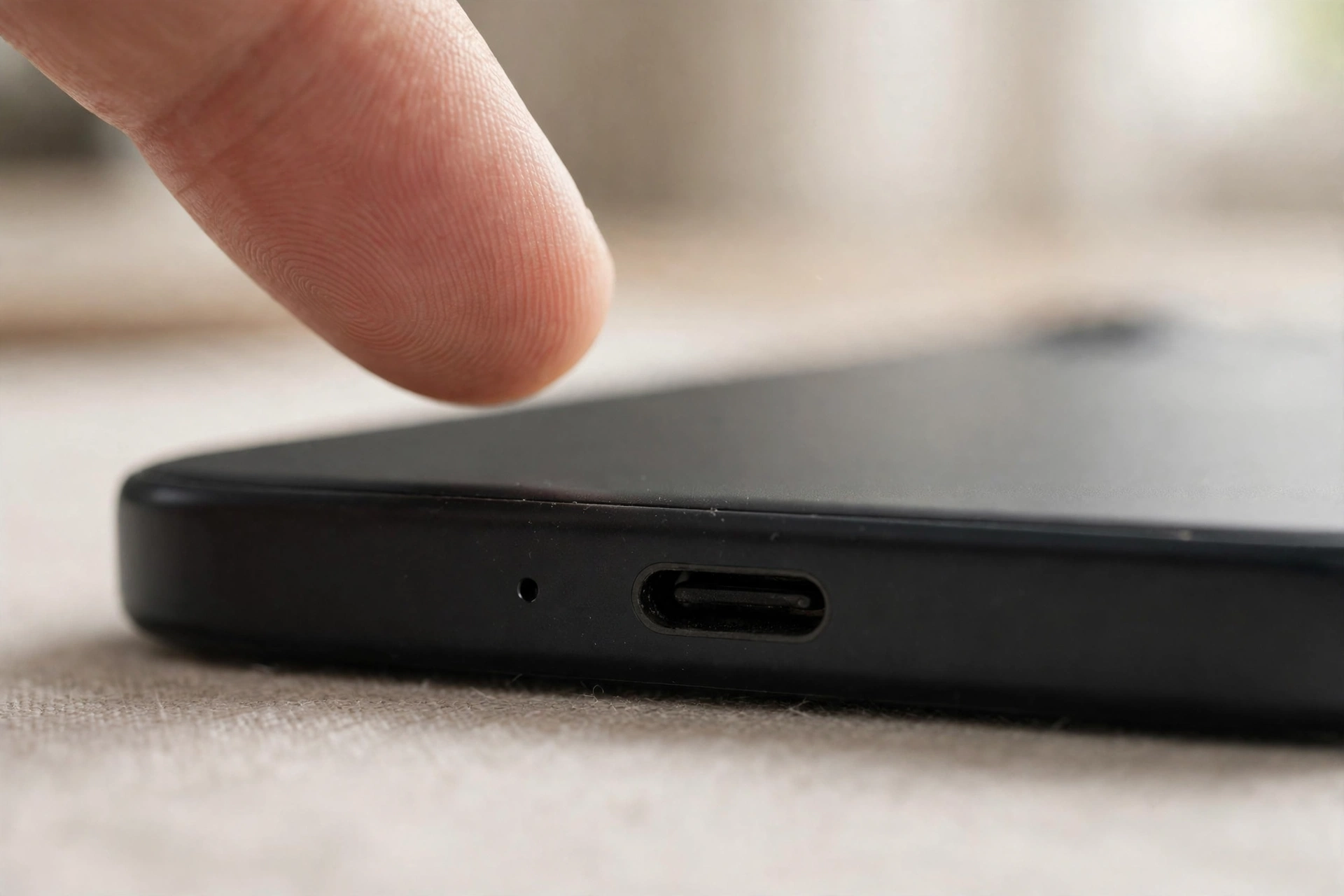
This is the most common cause of muffled call audio, and it’s easy to miss. Your phone’s main mic is a tiny hole on the bottom edge next to the charging port, with additional mics near the top edge for noise cancellation. A new case or screen protector can cover or partially cover one of these holes.
Remove your case completely and make a test call — or record a voice memo and play it back. If your voice suddenly sounds clear, the case is the culprit. Check that your case’s cutouts align exactly with the mic holes; cheap cases are often slightly off. Camera lens protectors can also cover a top mic, so inspect those too.
Fix 2: Stop Covering the Mic With Your Finger
Most people don’t realize how they hold their phone during a call. Your pinky finger naturally curls under the bottom edge — right where the main microphone sits. On longer calls your grip shifts and a finger ends up pressed over the mic hole, making you sound suddenly muffled or far away.
Hold the phone by its sides, keeping the bottom edge clear. If you’re on speakerphone, don’t lay the phone face-down or hold it cupped in your palm — both muffle the mic.
Fix 3: Clean the Microphone Holes
Like speaker grilles, mic holes collect dust, pocket lint, and makeup residue. A clogged mic hole acts like a pillow over the microphone — your voice gets through, but sounds dull. The buildup is gradual, so quality declines without you noticing.
Power off your phone first. Shine a flashlight at the bottom edge and find the tiny mic pinhole. Gently sweep a soft, dry toothbrush across the hole — never poke a pin into it, since that can puncture the mesh or the seal behind it. A quick pass with sticky tack pressed over the hole and peeled off can lift out packed lint. Then record a voice memo to compare.
Fix 4: Test Each Mic With a Voice Recording
Your phone has multiple microphones, and isolating which one is muffled tells you whether it’s a hardware fault or something else. Record three short voice memos:
- Normal hold: speak into the bottom of the phone as on a call. This tests the main mic.
- Speakerphone: switch to speaker and talk from a foot away. This tests the secondary mic array.
- Video: record a short selfie video while talking. This tests the top/front mic.
If only one recording sounds muffled, that specific mic is blocked or faulty. If all three sound bad, the issue is more likely software or network-related — move on to the next fixes. This simple test saves you from cleaning the wrong hole or replacing a phone that just needs a settings change.
Fix 5: Turn Off Noise Cancellation and Audio “Enhancements”
Ironically, the features meant to make you sound clearer can make you sound worse. Noise cancellation compares the main mic against secondary mics and subtracts background sound — but if one mic is partially blocked, the algorithm gets confused and your voice comes out muffled, robotic, or choppy.
On iPhone, try turning off Phone Noise Cancellation (Settings > Accessibility > Audio/Visual) and make a test call. On Android, look for “noise reduction” or “voice enhancement” toggles in sound or phone-app settings and try them both on and off. Also check third-party apps: equalizers, call recorders, and voice-changer apps can all degrade your mic audio. If the muffling started after installing an app, uninstall it and test again.
Fix 6: Check Your Network and HD Voice Settings
If the muffling only happens in certain locations (your office, your commute), the network — not your phone — is the cause. On a weak signal, your carrier drops the call to a lower-quality audio codec, and your voice arrives compressed and muddy.
A few things to try: toggle Wi-Fi calling on or off and compare. Make sure VoLTE / “HD voice” is enabled — it dramatically improves call clarity when both phones and the network support it. If the problem started after a carrier or OS update, reset your network settings (this forgets saved Wi-Fi passwords, so have them handy). And if you’re on a Bluetooth headset during these calls, the headset’s mic — not your phone’s — is what the caller hears; test with the headset disconnected.
Fix 7: Inspect for Water Damage or a Failing Mic
If moisture is trapped in the mic mesh after the phone got wet, a low-frequency sound burst can help shake it out of small ports. Our free tool at https://myspeakerfix.com/ plays an oscillating tone designed to push water and debris out of speaker and mic grilles — run it with the phone’s bottom edge facing down and see if call clarity improves as it dries.
Signs the mic itself is failing rather than blocked: your voice cuts in and out when you tap near the mic hole, only one mic (from the Fix 4 test) is bad after cleaning, or the muffling persists after resetting all settings. A single dead mic is a common, inexpensive repair at independent shops — but if your phone is under warranty, contact the manufacturer first, since mic failure without physical damage is typically covered.
Frequently Asked Questions
Why do I sound muffled only on speakerphone?
On speakerphone, your phone switches to its secondary mics. If a case edge covers the top mic, or your hand cups the phone, the noise-cancellation gets bad input and muffles your voice. Hold the phone flat with the screen up and the bottom edge clear.
Can a dirty mic hole really make that much difference?
Yes. The mic hole is barely a millimeter wide, so even a thin film of lint or residue dramatically reduces the sound reaching the mic. Because the buildup is gradual, people often blame the network or the other person’s phone before checking the mic.
Why do callers hear me fine on WhatsApp but not on regular calls?
WhatsApp uses its own audio processing and often different mic routing than your carrier’s phone app. If app calls are clear but cellular calls are muffled, check VoLTE/HD voice and Wi-Fi calling settings, or a misbehaving setting in the stock phone app.
Will a software update fix my muffled mic?
Occasionally, yes — mic and audio-driver bugs do get patched in OS updates, and sometimes introduced by them. If the muffling started right after an update, that’s a strong clue it’s software, not hardware. Also check for updates to your phone/dialer app.