
Cleaning Your Phone’s Charging Port Without Breaking It
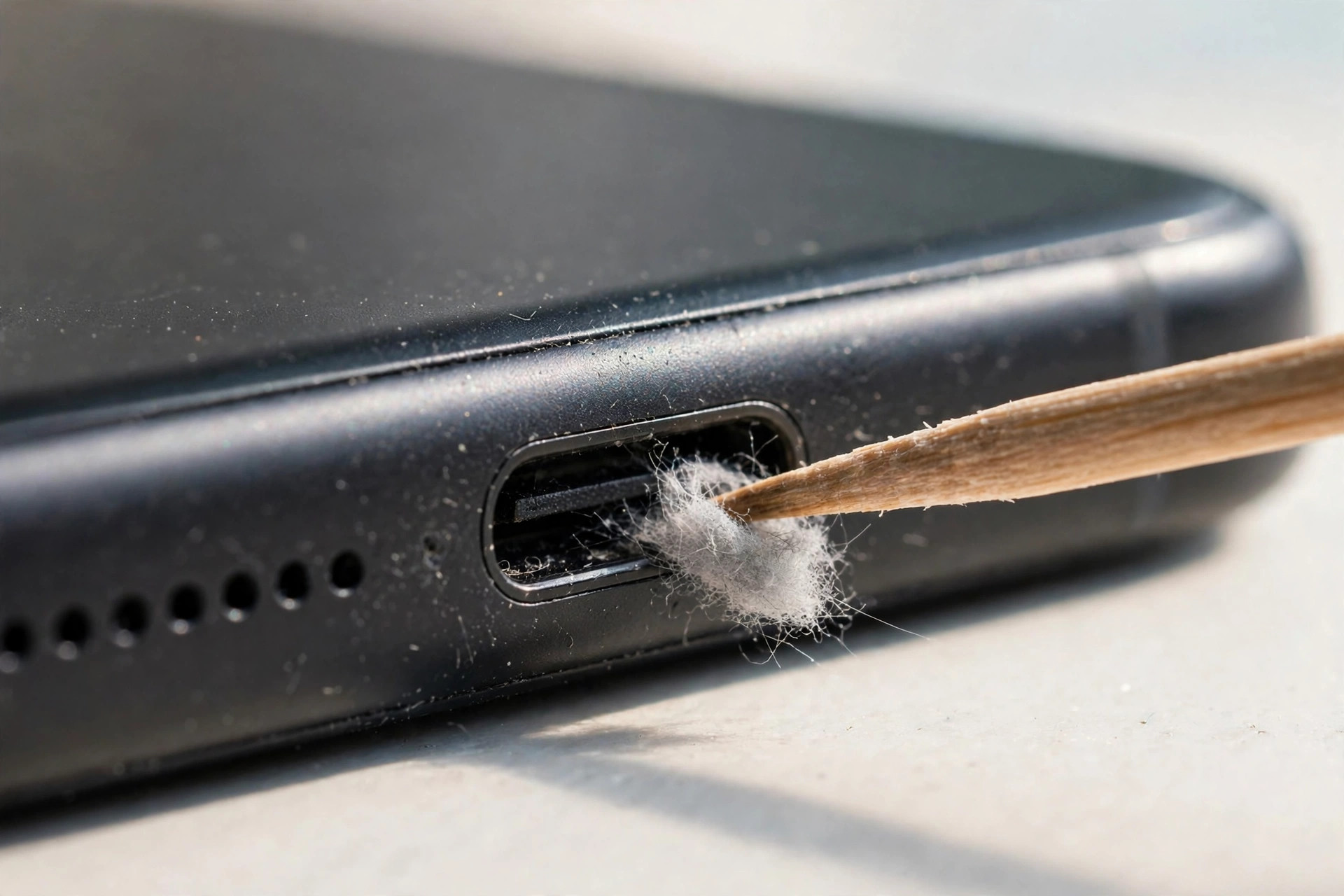
Your cable used to click in with a firm little snap. Now it wobbles, or only charges when you hold it at exactly the right angle. Before you blame the cable or assume the port is broken, check for lint — that’s usually all it is.
Every time your phone slides into a pocket, tiny fibres drift into the open port. They settle at the bottom, get pressed flat by the plug, and build into a dense pad. Once that pad stops the plug seating fully, the cable feels loose — because it genuinely isn’t going in all the way. The fix takes five minutes and needs nothing fancier than a toothpick and a soft brush. The trick is knowing what to use, what never to put near the port, and how to tell lint from real damage.
Why a loose cable usually means lint, not a broken port
A charging port is a tight slot, and the plug fits it with almost no slack. Even a millimetre of packed lint changes that fit: the plug stops short, the clips can’t grip, and the cable rocks from side to side. That’s the wobble you’re feeling.
Lint also explains the on-and-off charging. The plug sits crooked on the pad of fluff, so the contacts touch only sometimes: nudge the phone and the connection drops, hold the cable at an angle and it works again. A broken port behaves differently — it usually stops working altogether, or only works with one cable. If every cable feels loose, the port is the common factor, and lint is the prime suspect.
Shine a torch into the port first. A grey or whitish layer at the bottom is the lint pad. If the inside looks clean and the plug still wobbles, the spring clips may be worn — a repair-shop job, not a cleaning job. Don’t force anything.
The safe tools — and the ones that damage the port
You don’t need a special kit. The best cleaning tool is a plain wooden toothpick: wood is soft enough not to scratch the metal contacts, and thin enough to reach the bottom of the port. Snap the sharp tip off first so you’re working with a blunt end. A dry, soft toothbrush sweeps fluff out of the corners, and compressed air helps in short bursts from a few inches away, held upright.
Now the list that matters more — the tools that wreck ports. Never use a metal pin, a needle, a paperclip, or a SIM ejector tool. Metal is harder than the contacts, and one slip scrapes the gold plating off a pin; once it’s gone, the contact corrodes and the port never charges reliably again. Never pour or spray liquid into the port, and don’t use a wet cotton bud: fluids can short the pins and leave residue that attracts lint. Skip the vacuum nozzle too — its hard rim can crack the port’s frame. And don’t jam the cable in harder to “push through” the lint; that only packs the fluff tighter.
Switch the phone off before you start: a toothpick doesn’t conduct electricity, but powering down removes any chance of a short while you work inside the port.
The step-by-step clean
Start with the phone off and a torch handy, holding it port-down so anything you loosen falls out instead of deeper in.
Take your blunted toothpick and slide it gently along the floor of the port — not the sides, where the pins sit. Work corner to corner with light, short strokes, like sweeping a tiny floor. You’ll feel the lint pad give way. Tip the phone so the fluff falls out. If you meet resistance, change angle; never push harder.
Next, brush the port with the dry toothbrush — short strokes sweep out the fibres the toothpick loosened. Then two short bursts of compressed air from a few inches away, can upright, port facing down, to clear the dust the brush missed.
Now plug the cable in — it should slide in further and click with that firm snap you remember. Switch the phone on and check that charging starts without you holding it. If it still wobbles, repeat the toothpick pass once — the pad is sometimes layered, and the first pass only takes the top off. If three gentle passes change nothing, stop: it isn’t lint, and more scraping only damages the pins.
The whole routine takes about five minutes. Repeat it every couple of months and lint never gets thick enough to cause trouble.
When cleaning isn’t enough
Cleaning fixes the loose-cable problem in most cases — but not every charging fault is lint. Here’s how to read the signs.
If the cable clicks in firmly now but the phone still won’t charge, try a different cable and charger. A frayed cable or tired charger brick can mimic a port fault perfectly. If a second cable works, yours was the problem all along. If the phone charges from a wall socket but not your laptop, that port may not deliver enough power.
If the plug still feels loose after a proper clean, the spring clips may be worn or bent — that happens after long daily use, and no cleaning fixes it. The same goes for a port that charges but won’t transfer data, or one that only works with the cable bent at an angle — a damaged pin or a cracked solder joint. Both are repair-shop jobs — a good shop quotes before opening the phone, so ask for it in writing, and whether the repair carries a warranty.
One last check: if the phone gets hot while charging, or you smell anything odd near the port, stop charging and get it looked at. That’s not lint — and not worth risking the battery over.
Tested on
Try this yourself — five minutes tells you straight away whether lint was the problem.
Switch the phone off and shine a torch into the port. Snap the tip off a wooden toothpick so the end is blunt, then sweep gently along the floor of the port. Tip the phone so the fluff falls out, brush the opening with a dry toothbrush, and give it two short bursts of compressed air.
Now plug the cable in — if it slides in further and clicks with a firm snap, lint was the cause. Switch the phone on and check that charging starts without you holding the cable. If it still wobbles after two gentle passes, stop — the fault is elsewhere.
Frequently Asked Questions
Can I use a SIM ejector tool to clean my charging port?
No. A SIM ejector is metal and thin enough to slip between the pins, where it can scratch the gold plating or bend a contact. A blunt wooden toothpick is softer than the contacts and won’t harm them.
Why does my charging cable feel loose?
Packed lint stops the plug seating fully, so the spring clips can’t grip and the cable rocks. A gentle clean with a toothpick usually restores the firm click.
Is compressed air safe for a charging port?
Yes, in short bursts from a few inches away, can upright and port facing down. Never spray at close range or with the can tilted — liquid propellant can escape into the port.
How often should I clean my charging port?
Every couple of months is enough for most people. If you carry your phone loose in a pocket all day, check it monthly — a quick torch check shows whether lint is building up.